
2023/2024
Tunifi
Tunifi is a revolutionary music app that brings the electrifying atmosphere of live concerts straight to your fingertips.
Tunifi approached me with the vision of creating a music app that would bridge the gap between live concert experiences and users' everyday lives. My task was to design and a user-friendly and immersive mobile application that would enable users to access high-quality live concert streams, engage with interactive features, and enjoy on-demand access to past performances.
Tools
-
Figma
-
Illustrator
-
Miro
-
Notion
My Role
-
UX | UI Designer
(solo role)
Process
-
Discovery
-
Ideation
-
Design
-
Testing
-
Reflection
Problem Satatement
Design a music player app that effectively curates and delivers personalized content based on the user’s preferences, with an intuitive interface that enhances the experience. The app’s machine learning capabilities should continuously improve with regular use, offering increasingly accurate recommendations. Additionally, the app should provide seamless access to live stream concerts, allowing users to enjoy exclusive live performances, interact with artists in real-time, and share the experience with friends. The app should also foster a vibrant social community by enabling post-concert chats, discussion forums, and shared playlists, all within a user-friendly and intuitive platform.

My Design Process


Desk Research
Frequency of Live Concert Attendance


Competition Analysis
Surveys
For my research, I employed a combination of multiple-choice and open-ended surveys to gather insights into live concert attendance behavior and the reasons why individuals may not attend live concerts.
Survey Participation: A total of 138 individuals participated in the survey, representing a diverse demographic range in terms of age, gender, income level, and geographic location.


Conclusions: Based on the survey responses, several key conclusions were drawn regarding live concert attendance behavior and the barriers preventing individuals from attending live concerts.
Application of Findings: informing that addresses the identified barriers to live concert attendance.
These conclusions included:
-
Financial constraints
-
Time constraints
-
Geographical limitations
-
Health and safety concerns
-
Preferences for alternative
entertainment options
Key applications included:
-
Preferred Genres and Artists
-
Concert Attendance Behavior
-
Streaming Preferences
-
Social and Community Engagement
-
Accessibility Needs
-
Geographic Preferences
-
Pricing Sensitivity

Overall, the survey findings played a pivotal role in guiding the project's direction and ensuring that Tunify effectively addresses the needs and preferences of its target audience, thereby enhancing the live music experience for users worldwide.

User Stories
Crucial user stories for demonstrating the core functionalities of the music app
and ensuring a seamless user experience:
As a user
I want to be able to discover upcoming live concerts and events in my area or globally through the app's search or browse functionality.
As a concert attendee
I want to be able to purchase virtual tickets to live concert streams, allowing me to support my favorite artists and access premium content from the comfort of my own home.
As a music lover
I want to be able to customize my concert experience by setting reminders for upcoming events, creating personalized playlists featuring my favorite artists, and receiving notifications about new releases or live streams.
As a virtual concert attendee
I want to be able to engage with other fans through interactive features such as live chat, audience polls, and virtual meet-and-greets with artists.
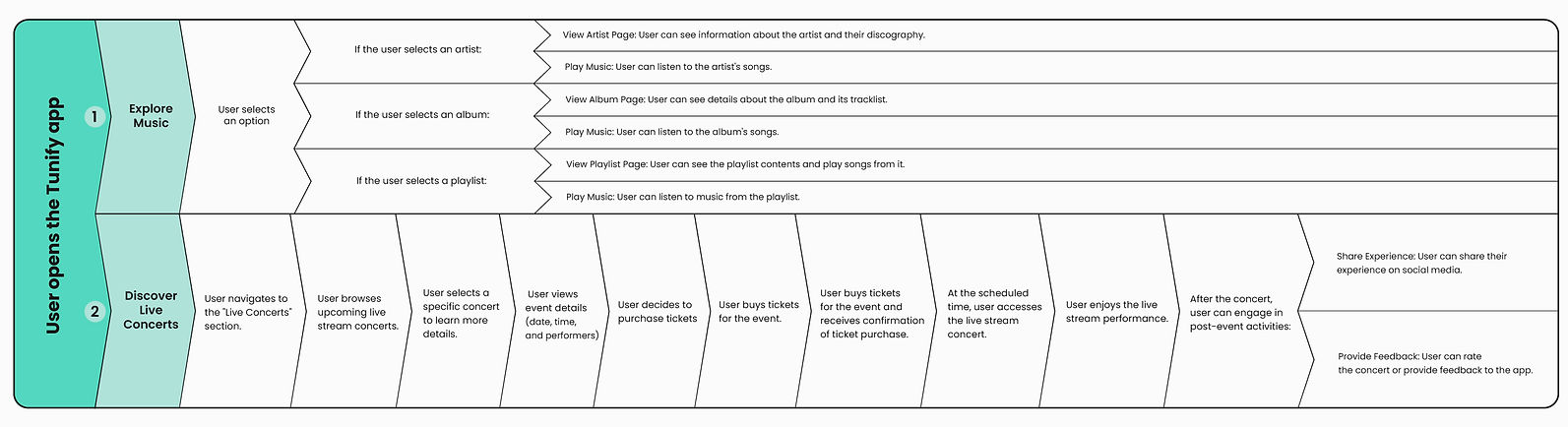
User Journey Map

User Flow

Wireframes
Starting with my initial sketches, I transitioned them into low-fidelity wireframes using Figma. These wireframes reached a stage where they were ready for initial user testing. After gathering feedback from users, I made necessary alterations and proceeded to develop high-fidelity prototypes.


UI Design
I didn't strictly adhere to specific design guidelines like Material Design or iOS Styleguide,
I drew inspiration from the best practices:
-
modern and minimalist style
-
dark mode
-
high contrasts
-
monochromatic palette accented by a single Teal color
-
prioritized simplicity and accessibility
-
easy to navigate and read
-
vibrant album artwork and artist photos


Low-fidelity


High-fidelity


Usability Testing
I conduct usability testing sessions with target users to observe how they navigate through the app and identify any pain points or areas of confusion.
Here are the key details and outcomes from these tests:
-
Participants:
-
Six target users participated in the usability testing sessions.
-
-
Test Findings:
-
Dissapearing of text placeholders on Login and Sign up screens: Users, when writing, didn't see what they actually had to write.
-
Navigation Issues: Users found it difficult to access the live stream section from various parts of the app.
-
Confusion with add to favourite and add to library icons: Some icons were not intuitive, leading to confusion about their functionality.
-

What I improved after tests
1. To improve user experience I add text labels on Login and Sign Up screens. I also added checkbox to accept Term and Conditions when user is singing up.

2. I deleted heart icon from the navigation bar and I add in this place Live Stream icon, from now User has access to the Live Strem menu from every screen in the app.

3. I changed all heart icons on + and - icons, now User should know that one icon can add songs, playlists, artists etc. to the categories in the library.


Tunifi is poised to revolutionize the music streaming landscape by offering an immersive, interactive, and personalized live music experience. Its unique focus on live concerts, combined with high-quality streaming, exclusive artist interactions, and robust social features, sets it apart from existing apps. We are confident that Tunifi will not only meet the demands of today's music fans but also create new opportunities for artist-fan engagement and monetization.
Focused Niche:
-
While competitors like Spotify, Tidal, and YouTube Music offer broad music libraries, Tunifi’s focus on live concert streaming and exclusive artist interactions addresses a specific market need, differentiating it from the rest.
Enhanced Engagement:
-
Tunifi's unique features such as live interactions, high-quality streaming, and social sharing create a more engaging and dynamic user experience compared to traditional music apps.
Strong Monetization Potential:
-
The app’s unique offerings, such as virtual concert tickets and exclusive content, provide multiple revenue streams beyond standard subscription models, appealing to a wide range of music fans.

Next steps and planning features
Continuing this project, I would focus on further refining the high-fidelity prototypes based on user feedback and usability testing results. This iterative process would involve fine-tuning the visual design, optimizing the user interface for seamless navigation, and ensuring consistency across all screens and interactions.
In the final design phase, I would revisit the user journey map and conduct a thorough review to identify any areas that may still present challenges or opportunities for improvement. By reassessing the user experience from end to end, I would ensure that the final design effectively addresses user needs and aligns with the project's goals.
Smart Scheduling Assistant
-
Description: An intelligent scheduling feature that analyzes users' calendars and preferences to suggest optimal times for watching live streams and attending virtual events. It ensures users never miss their favorite concerts by providing reminders and syncing with their personal schedules.
-
Benefits: Helps users manage their time effectively, increasing the likelihood of concert attendance and enhancing overall user satisfaction.
AR Concert Experiences
-
Description: This feature uses AR technology to create immersive and interactive concert experiences. Users can project live concerts into their environment, view augmented visuals, and interact with 3D elements during the performance.
-
Benefits: Enhances the live concert experience by blending digital and physical worlds, providing a unique and engaging way to enjoy performances.
Adaptive Sound Optimization
-
Description: This feature analyzes the user's listening environment in real-time and automatically adjusts the audio settings for optimal sound quality. Whether the user is using headphones, speakers, or a home theater system, the app ensures the best possible audio experience.
-
Benefits: Enhances the auditory experience by providing high-quality sound tailored to the user's current setup and environment.
Learnings
Throughout this project, I delved into advanced prototyping techniques using Figma, refining my ability to create interactive and realistic prototypes. This hands-on experience allowed me to explore new design.
One new design practice I embraced was comprehensive user journey mapping, which provided valuable insights into user needs and behaviors. By mapping out the user's experience from start to finish, I gained a deeper understanding of pain points and opportunities for improvement in the user experience. This approach helped me design more user-centric solutions and prioritize features based on user needs and preferences.
This project significantly contributed to my growth as a designer by challenging and expanding my design thinking. It taught me the importance of remaining open-minded and adaptable in the face of new insights and feedback.